Thursday, April 28, 2011

Review Samsum NB30 Black Netbook Touch

Review Samsum NB30 Black Netbook Touch
The design of the Samsung Touch NB30 is simple, featuring an elegant black color with a special scratch-wave radial texture, offering a netbook with some originality. The hard disk is protected from shocks and vibrations, thanks to the solution Antishock, the fall sensor that protects data stored in an emergency. The chassis is rugged and shock resistant and more violent, thanks to a reinforced structure. The keyboard is resistant to liquids.

Developed in response to the increasing mobility needs of the typical professional use, Samsung is available in traditional or Touch. The latter model incorporates a touch screen NB30 10.1-inch for easy access and access to different applications of the netbook with the simple touch of the screen ensuring maximum usability and ease of use of the information.

  • Processor: Intel Atom N450 1.66GHz
  • Operating system: Windows 7 Starter Edition
  • Memory: 1GB DDT2
  • Screen: 10.1-inch WSVGA 1024 x 600 pixels, not gloss, LED (touchscreen model only NB30-JT01IT)
  • Hard disk: 160GB or 250GB, 5400rpm
  • Graphics: Intel GMA X3150
  • Networking: 802.11b / g WiFi, 10/100 LAN, Bluetooth 2.1 + Enhanced Data Rate
  • Interfaces: Memory Card Reader 3-in-1 (SD, SDHC, MMC), 3 USB 2.0 (one with feature charging from PC off), audio jack, VGA
  • Battery: 6 Cell Lithium Ion
  • Dimensions: 264 X 188.9 X 39mm
  • Weight: 1.26 kg (incl. 6-cell)
  • Other: Digital LiveCam
  • Price: 279 € (Samsung NB30), 399 € (NB30 Samsung Touch)


The touchpad has a large sensitive area and two selection buttons. The keyboard is waterproof, consists flat keys slightly apart from each other. On the left, are placed the power connector, Ethernet, the ventilation grille, and a USB audio jack, while on the right take place on Kensington Lock connector, a VGA, the other two USB ports and memory card reader. Overturning the netbook we notice the presence of a flap which facilitates access to RAM. Samsung NB30 costs € 279.


Samsung NB30 also integrates a number of software solutions to ensure top performance and functionality in a professional, such as Samsung Recovery Solution IV, which allows you to quickly resolve any problems of malfunction of the PC configuration or revert to the last quote netbook in terms of first use; Any remote PC access, through which you can control and manage the device remotely and securely access to documents just like working from your office desk, Fail Safe, software that allows you to locate product in case of theft or loss. NB30 Samsung also has the solution Battery Extender Manager to further extend battery life, improving performance and reducing consumption of the netbook.


Samsung Touch NB30 (NB30-JT01IT model) differs from the traditional model for the adoption of a touchscreen. It looks like the netbook touch less expensive on the market with a sale price equal to 399 €. The anti-glare display, opaque, not only is totally visible outdoors or in a particularly bright but does not retain fingerprints. As for the rest of the installation, NB30 Samsung Touch uses an Intel Atom N450, 250GB or 160GB hard drive and Windows 7.


To ensure full mobility, this product adopts the most advanced communication technologies: wireless LAN 802.11b/gper Internet access in super mode, 10/100 Ethernet card, Bluetooth 2.1 + EDR, integrated webcam, ideal for sharing information and communicate with colleagues via chat or video conference. NB30 Touch is finally equipped with a memory card reader, 3-in-1, microphone input, headphone output stereoe 3 USB ports, one with capacity to recharge even when turned off.

Toshiba Qosmio F45-AV411 Notebook Review

Toshiba Qosmio F45-AV411 Notebook Review
The Toshiba Qosmio F45-AV411 notebook with a 15.4 inch LCD UltraBright display is a multi-media giant. I looked high and low for a notebook with the capacity to run HD graphics smoothly and accurately. The problem is most notebooks with advanced graphics capability are in the $1300 on up price range. The Toshiba Qosmio F45 has the Intel Centrino Core 2 Duo processor with an Intel GM965 chipset and 1 GB Intel Turbo Memory.

Toshiba did not stop there, it included advanced graphics technology with the Intel Graphics Media Accelerator X3100. The super advanced optical drive is equipped with LabelFlash technology that is compatible with virtually all popular DVD/CD formats. Burning DVD/CDs has never been easier and better. These were the main features I was looking for and I was able to find a reconditioned Qosmio F45 on two reputable web sites for $649 and $749 respectively. The difference in price between the two sites is unexplainable. It is the same model.

Laptops Specification :
  • Toshiba includes 802.11a/g/n LAN wireless connectivity. Also, included is an IEEE 1394 data port and Ethernet 10/100 card. The ability to connect up at a HOT SPOT, wireless home network or directly is a cinch. In less than 5-minutes I was able to connect the Toshiba Qosmio to my home wireless network. The built-in deluxe modem obviates the necessity of any external devices.
  • A huge improvement is the inclusion of Harman Kardon speakers and a complete Dolby Digital Sound 5.1 capacity. There isn’t a less than $2,000 laptop on the market with the pristine subwoofer and treble sounds found in the Toshiba Qosmio F45. Add some headphones and you are in a concert hall with exceptional acoustics.
  • Toshiba includes 2 GB RAM and a 200 GB hard drive. In addition, the model has an Express Card/Memory slot compatible with Memory Stick Pro, SD, MMC, xD Picture card and a 5-in-1 Bridge Media Adapter. As mentioned previously the advanced optical drive offers enormous capacity for running HD DVD/CD music, video and pictures.
  • The webcam with built-in microphones is a step above most notebook built-in webcams. The internal Graphics Accelerator and other advanced technology has forgiveness for people in motion. I have not had a blur-out or distorted image yet. It is a really fine webcam for keeping in touch with family and friends.
  • I was not a fan of Vista until now. The Toshiba Qosmio F45 comes installed with Windows Vista Ultimate. The OS takes a little getting used to. I will say, the big OS needs the likes of the Toshiba Qosmio F45 to run the platform. I personally think that has been one of the contributing factors in Vista’s bad wrap.
  • You wouldn’t ask Jeff Gordon to compete at the Daytona 500 with a 4-cylinder souped up Volkswagen. In fact, he would be barred from competing against the standard 8-cylinder field of competitors. The same is true of loading a big performer like Vista on a slow processor, a gig of RAM and little in the way of graphics technology. It sputters, drags and is a major disappointment. Not so, with the revved up Toshiba Qosmio F45.
  • I recommend the Toshiba Qosmio F45 AV411 to anyone with a need for high performance in a notebook.


Source : [comparelaptop.net]

Toshiba Qosmio F45AV410 PC Notebook Review

Toshiba Qosmio F45AV410 PC Notebook Review
The Qosmio F45-AV410 is your luxe mobile digital entertainment notebook with a 15.4-inch diagonal widescreen for playing movies and high fidelity audio. With a SuperMulti drive with Labelflash technology, Harman Kardon speakers and Dolby Home Theater digital audio, you have a variety of media at your fingertips. Intel Centrino Duo processor2 technology increases system responsiveness, makes multitasking faster, and extends battery life. New wireless 802.11ag4 and draft n WiFi5 provides reliable connections that won't slow you down.

Toshiba Qosmio F45AV410 Specs :

Place of Origin:Tokyo Tokyo in Japan
Model No:Toshiba Qosmio?F45-AV410 PC Notebook
Brand Name:Notebook
Other Price Terms:$500usd
Minimum Order:1unit
Supply Ability:30unit
Package:fedEx ups dhl
Delivery Time:72hours


[Via]

New Alienware Area 51-m5550 Gaming Laptop

New Alienware Area 51-m5550 Gaming Laptop
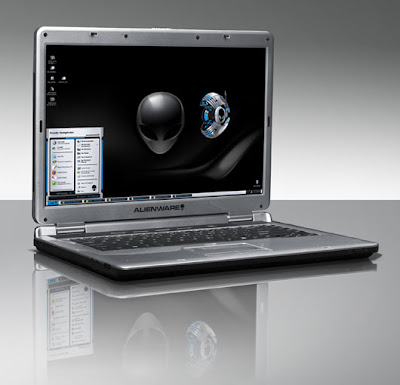
If you’re looking for top-notch performance, higher-end A/V connections, and futuristic design, the Alienware Area-51 m5550 delivers. However, if its terrible battery life, incomplete set of multimedia features, and high price sour the deal for you, keep on looking.

With its silver coloring, black accents, and glowing alien-head ornament, the m5550 looks way cooler than your typical mainstream notebook. The firm lid and scratch-resistant case give it a sturdy overall bearing. Measuring 14.3 x 10.7 x 1.9 inches, it’s not bad for its size at 6.8 pounds, though too bulky for regular travel.

The m5550’s translucent keyboard is quiet and comfortable to use except for a sinfully short spacebar that slowed our typing at first. The responsive touchpad and mouse buttons are of adequate size, however, and the touchpad features vertical and horizontal scrolling zones for speedier Web page and document navigation; we also like the external touchpad on/off button that lets you prevent unintentional cursor movement when using an external mouse.

The 15.4-inch widescreen display serves up crisp, vivid colors and images, and the WXGA native resolution, average for a display this size, offers a nice balance of readability and screen real estate. (Upgrading to a finer WUXGA panel adds $100 to the price tag—-a worthwhile investment for graphics pros.) We appreciate the external volume control wheel, and the two stereo speakers deliver clear audio, though they don’t crank as loud as we’d like.

The m5550 accommodates some deluxe connections: Besides three USB 2.0 ports, FireWire, S-Video, an ExpressCard slot, and a 4-in-1 card reader, you get a DVI output, for connecting digitally to an external display, and an optical audio port. Also onboard are Ethernet and modem ports, and there’s a handy Wi-Fi on/off switch.

Pricey for a mainstream notebook, the $2,429 m5550 we tested came equipped with a top-shelf processor, Intel’s 2.33-GHz Core 2 Duo T7600, which turned in a simply blazing MobileMark 2005 score of 279. Unfortunately, with high performance came high temperature: The m5550 ran quite hot, particularly on either side of the touchpad, which resulted in sweaty wrists during extended typing sessions. Unless you routinely work with demanding video-editing software, we recommend configuring the m5550 with a lower-end processor; it’ll generate less heat, extend your battery life, and save you hundreds of dollars, without sacrificing that much speed.

Powered by Nvidia’s mid-tier 256MB GeForce Go 7600 graphics card, the m5550 notched an impressive 3DMark03 score of 8,235. Gaming performance, on the other hand, was less spectacular: The m5550 turned in only 37 fps on our F.E.A.R. gaming benchmark (with settings on autodetect)—-not terrible, but insufficient for hardcore gaming.

For all of its processing muscle, the m5550 fails to live up to its multimedia potential: You get Windows XP Media Center 2005, but no TV tuner option to let you record programs to the 100GB hard drive; an IR port, but no remote; and no external controls for the dual-layer DVD drive. The included software package is similarly modest: Aside from the OS, there are two disc-burning apps—and that’s it.

In our battery drain tests, the m5550’s 6-cell lasted a meager 1 hour and 47 minutes whether the wireless connection was on or off—at least an hour and a half less than most mainstream models. The m5550’s Wi-Fi reception wasn’t particularly great, either; we detected an average throughput of 7.3 Mbps from 15 feet and 6.9 Mbps from 50 feet.

If you’re looking for superior processing performance at any cost, the Alienware Area-51 m5550 certainly screams. However, there are plenty of other, more balanced models on the market.

Price: $2,429


Source : [http://archive.laptopmag.com/review/Alienware-Area-51-m5550.ht]

Tuesday, April 26, 2011

New Gigabyte T1125N-CF2 Convertible Laptop Review

New Gigabyte T1125N-CF2 Convertible Laptop Review
New Gigabyte T1125N-CF2 Convertible Laptop: The The Gigabyte T1125N-CF2 is a good convertible laptop, which has an Intel dual core processor, a 11.6-inch HD multitouch display with resolution of 1366×768 pixel and 180 degree rotatable, NVIDIA GeForce GT330 Graphics with Optimus Technology, 4GB DDR3 memory, 500GB hard drive and supports a 1.3 megapixel webcam, a full size keyboard, Gigabit Ethernet, WiFi 802.11 b/g/n, Bluetooth 2.1, HDMI output, USB 3.0 and USB 2.0 ports, HSDPA (3.5G) compatibility, a 6-cell battery and pre-installed with Windows 7 OS. The Gigabyte T1125N-CF2 convertible laptop also has a docking station with a DVD Supermulti drive, USB3.0 port, VGA, Audio and HDMI output.
New Gigabyte T1125N-CF2 Convertible Laptop Review

Source : [http://www.laptopsworld.org/new-gigabyte-t1125n-cf2-convertible-laptop.html]

Dell Precision M4600 / 15.6 inch Mobile Workstations

Dell Precision M4600 / 15.6 inch Mobile Workstations
Dell has just announced an update to the Dell Precision M4600 notebook, a 15.6 inch″ mobile workstation designed to deliver a desktop replacement experience that travels wherever you need to go.The Precision M4600 is the entry level Dell mobile workstation, but there’s nothing entry level about the specs and features. The bigger version, with more advanced graphics options is the Dell Precision M6600.

The M4600 makes use of the new Sandy Bridge, 2nd Generation Intel Core i Family of processors. The processor options include Core i5 and Core i7 options, including up to a Quad-Core i7 Extreme processor option. There are also options vPro options to assist with IT management.The Precision mobile workstations can handle up to 32GB of 1333MHz RAM and 16GB 1600MHz RAM. The systems will support 32GB 1600MHz RAM when the larger DIM sizes are available. The 1600MHz memory is something Dell calls out as unique to the Dell Mobile workstations and is available on all Quad-Core processor options.

The new Precision M4600 mobile workstations include NVIDIA QUADRO and AMD FirePro graphics options. The AMD FirePro M5950 has 1GB DDR5 and supports 3 displays with the included ports and can be extended further with a dock. There are also two NVIDIA QUADRO processors, the 1000M and 2000M which have 2GB DDR3 dedicated memory. The NVIDIA options include NVIDIA Optimus to intelligently switch to the integrated Intel 3000 HD graphics.The M4600 has a collection of 15.6″ displays which fit various use cases and needs. Included in the options is a Premier Color IPS RGB panel with support of over a billion colors. There is also a multitouch option with four finger touch support and a stylus. The base resolution is 1366 x 768, but you can also get a 15.6″ display with a 1920 x 1080 resolution.The RGB screen option includes the ability to customize color settings for different applications.

The M4600 has a collection of storage options including up to 750GB 7200RPM hard drive and an increase in the size of the mini SSD department from 64GB to 128GB. The Mini SSD can be combined with the traditional hard drive or with a second SSD. If you have the same capacity SSD the Precision M4600 will support RAID setups.

If you need to use different hard drives for different clients or projects, the primary hard drive can be removed with a level action. If you keep your OS on the mini SSD, you can leave sensitive data at a client site or secured in a hard drive easily, without losing the ability to use your notebook.The new M4600 has a new unique to the Precision line chassis which Mano Gialusis, Senior Product Manager of Dell Precision Mobile Workstations tells us is “unique from the ground up,” allowing for no compromises on the chassis in regards to thermals, CPUs and expandability that isn’t possible when you need to accommodate other notebook lines.On the outside, the Precision M4600 has an anodized aluminum case and allows users easy access to the internals with a two screw base plate.

The Precision line is designed to deliver a mobile notebook that doesn’t mean users need to give up any performance or rely on uploading data to a remote system. With the system options available Dell is aiming to deliver notebooks that can be used to work in Media or CAD and with Seismic Data to name a few.For users that need to ensure that applications work with the Precision notebooks, the M4600 is ISV certified to work with numerous third-party apps.The Precision mobile workstations are also compatible with the Dell Latitude E Family of docks.On the security side there is a fingerprint reader, TPM, Control Vault and there is the ability for a FIPS certified encrypted hard drive.The Precision M4600 is durable as well as secure. The M4600 isn’t to the Dell XFR level, but it is MILSPEC 810G level.The Dell Precision M4600 will start at $1,678 and will be available on May 10th.


Source : [notebooks.com]


Compaq Presario V3000/14.1-inch Series Notebook PC

Compaq Presario V3000/14.1-inch  Series Notebook PC
Featuring an innovative industrial design, the lightweight Compaq Presario V3000 Series Notebook PC combines must-have mobile technology with the power of a desktop PC resulting in a versatile notebook PC that appeals to consumers with a fast-paced lifestyle.

This sleek Compaq Presario allows consumers to multi-task on the go with the latest dual-core(1) mobile technology from Intel and, the upcoming dual-core(1) processors from AMD. These mobile technologies support the latest wireless connectivity options and extended battery life, enabling users to stay connected longer while on the go. Also new to the Presario line, HP QuickPlay(2) allows users to enjoy their favorite movies, music and photos with a touch of the button without booting up the PC. The notebook features a durable, shiny finish plus touch-sensitive, backlit buttons and volume control. With a 14.1-inch high-definition(3) widescreen display and optional BrightView technology, consumers can enjoy movies and digital photos with great vibrancy and clarity. Available with up to 100GB hard drive and up to 2,048MB of memory, the V3000 allows consumers to take their work on the road with confidence and style.

Key Features and Benefits :
  • The V3000 is cloaked with HP’s Imprint finish which incorporates an advanced molding technique produced using Nissha Film Products. The V3000’s unique high-gloss, brushed steel finish provides greater scratch-resistance than traditional painted surfaces. Brushed gunmetal accents and a roomy keyboard with smooth, rounded keys keep style and comfort at the consumer’s fingertips.
  • Taking the show on the road is better than ever with the choice of Intel® Centrino® Duo mobile technology(1,4) or the upcoming AMD Turion™ 64 X2 mobile processors.(1,4,5) With Intel Centrino Duo mobile technology,(1,4) users get dual-core performance and enhanced power-saving features for extended battery life(6) and expanded wireless(4) connectivity features for greater mobility. With the upcoming AMD Turion 64 X2 mobile processors,(1,4,5) consumers get powerful dual-core, future-ready computing and enhanced virus protection.(7)
  • New touch-technology buttons enable users to launch media applications and control volume and mute functions. The latch-free notebook also features colorful LED indicator lights that further enhance the sleek and


One advantage with this deal over the in-store holiday specials is Compaq will let you up the specs on your V3000 for only a few bucks more. $50 will bump your new notebook’s memory up to 1GB or your hard drive to 80 GB. For $40 you can move up to a DVD burner, while $25 will get you a brighter screen.

Price: P$20.00

Source : [notebooks.com]